Why I have rebuilt this site from scratch
The cobbler’s children go barefoot. I built this site back in 2017 and hadn’t touched it since. It worked, it looked reasonably good, and every time I remembered it existed I thought «one of these days». That day has come, and I ended up scrapping the whole thing and rebuilding it from scratch.
This article is the plain-English account: where I started from, what I found when I opened the bonnet, what broke along the way and how it ended up.
Where we started from
The site was built with WordPress, the software behind a good chunk of the internet. Nothing wrong with that. The problem was the version: 4.8, from 2017, running on a version of a language —PHP— that stopped receiving security updates in December 2018.
Translation: for almost eight years there had been a door open to the public with a lock that nobody made or repaired any more. It wasn’t that something was bound to happen; it was that if it did, there was nobody to call.
And there were warning signs. When I sat down to look at the server logs I discovered that on a single day it had received 2,578 automated attempts to guess the password, all against the same entry point. That was almost half of all the traffic the site got that day. Nobody was attacking me in particular: these are bots that roam the entire internet trying doors.
The detail that gave me most pause was another one, and a sillier one. While reviewing the server I realised that the site had been down for five days and I hadn’t noticed. Neither had anyone else. That says quite a lot about how much attention I was paying to it.
What I did
I replaced the whole kitchen, not the tiles.
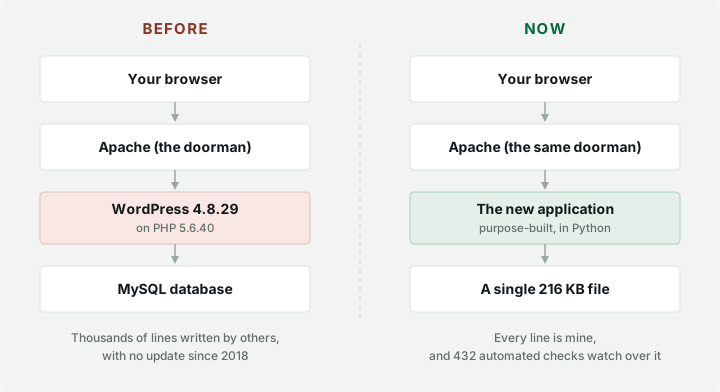
The important difference isn’t that one column is more modern than the other. It’s the number of things that have to go right for you to see this page.
Before, between your browser and my text there was an enormous program, written by a great many people, with dozens of plugins, a separate database and an unmaintained language. Now there is a small program that does exactly what I need and nothing else, and the data fits in a single 216-kilobyte file —less than a photo from your phone.
That’s the underlying idea: a personal website doesn’t need a power station. It needs a light bulb that doesn’t blow.
How it was done, step by step
You don’t do it in one sitting, and above all you don’t switch off the old thing until the new one has been tested.
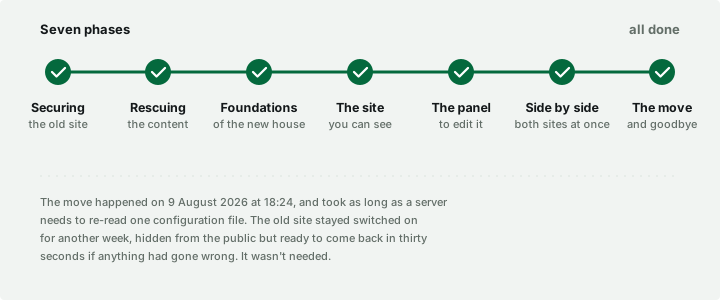
Securing the old site. Before touching anything, a complete copy of everything: files, database, images. And while I was at it, closing off the most urgent holes in the old site, because it was going to stay up for a few more weeks.
That’s when the uncomfortable things surfaced: test files forgotten since 2015, an access key for a Google service and a password written in plain text, all of it reachable from the internet by anyone who knew where to look. Removed, and noted down so those credentials could be changed.
Rescuing the content. The articles, the projects, the opinions, the photos: all of that lived inside WordPress and had to come out without losing a single accent. It was done with a program that extracts it automatically. I didn’t copy anything by hand, which is where mistakes creep in and where patience runs out.
The foundations. Deciding how each thing is stored: a professional role, a project, a technology. It sounds dull and it’s the part you notice most afterwards. An example: on the old site the names of the same two consultancies appeared five times in a row, because the system didn’t distinguish between who you work for and which client you deliver the service to. Now they are two different things, and the career history reads at a glance.
The site you see. A new design, built to be read: no pop-ups, no cookie banners —because there are no cookies to warn about— and no fonts or trackers loaded from other companies. Everything this page loads comes from this server. And my email address no longer appears written anywhere: there’s a form, which is the thing address harvesters don’t know how to fill in.
The panel for editing it. A private area for changing the content without touching anything technical. It only responds from my home network, and even then it asks for a password.
Running both together. The two sites live at the same time for a while, the old one facing the public and the new one waiting behind a side door, so I could compare them page by page without anyone outside noticing a thing.
The move. Changing the name on the door. More on that below, because it turned out to be the shortest part and the one that taught me the most.
In two languages, and with the CV as a PDF
Two things that weren’t in the plan and ended up making the cut.
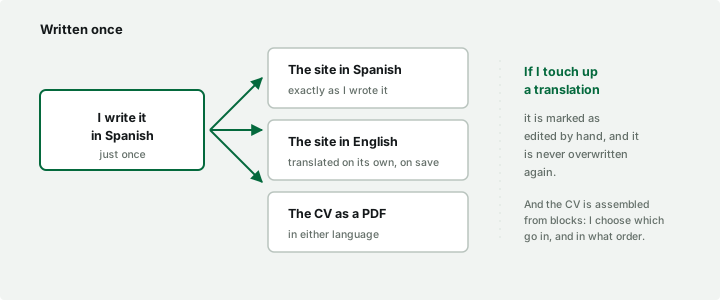
The whole site is available in Spanish and English. I always write in Spanish, and the English version is generated automatically on save. The important part is the ground rule: if I ever correct a translation by hand, that sentence is flagged and never overwritten again. Without that, any tweak of mine would last until the next time I edited the original text.
And the CV can be downloaded as a PDF, in whichever language you’re browsing. It isn’t a file I upload and then forget to update: it’s assembled on the spot from the same data you see on screen, so it can’t fall out of step with the site. From the panel I choose which sections go in and in what order.
The difference it makes
This can be measured, so I measured it: both sites, on the same server, side by side.
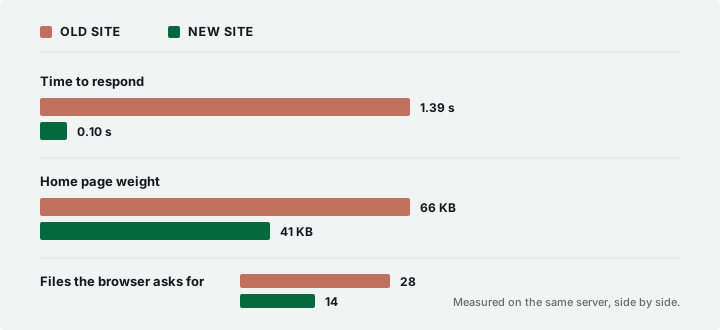
Fourteen times faster. And of the 14 files the home page now requests, 11 are the project images: as for «machinery», all that’s left is one stylesheet and a 50 KB helper script.
The photos have been put on a diet too. Each image is stored in three sizes and the browser picks whichever suits it best for the screen, so on a phone you don’t download an image meant for a large monitor. They weigh 76 % less than the originals.
Underneath there’s something you can’t see but which is what lets me sleep: 432 automated checks that run every time something changes. They’re small tests that verify that email goes out, that the old addresses still lead where they should, that the colours have enough contrast to be readable. If something breaks, it trips before it gets here. They’ve already caught several bugs I would never have spotted.
How it gets updated now
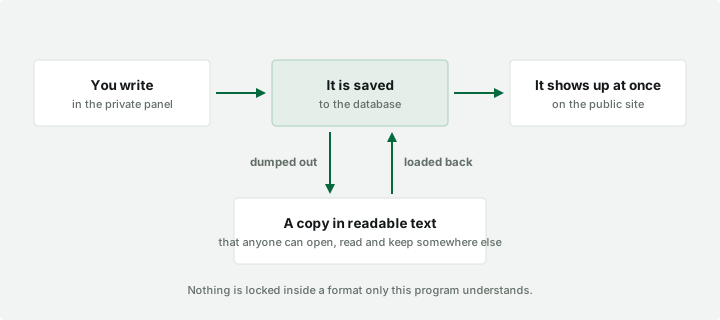
The important thing in this diagram is the arrow at the bottom. All the content can be dumped to an ordinary text file, which opens in any editor, can be read without any special software and can be kept wherever you like. And from that file the entire site can be rebuilt on another machine.
That’s the lesson from the previous site: anything only one particular program can read is trapped inside that program. And programs expire.
The move, and what broke
The switch from the old site to the new one happened on 9 August 2026 at 18:24, and consisted of changing one configuration file and telling the server to re-read it. Nobody was disconnected. The old site stayed switched on for another week, hidden from the public but ready to come back within thirty seconds if anything had gone wrong.
It wasn’t needed. But three things did come up that are worth recounting, because the interesting part of a project like this isn’t the list of what went right.
The site didn’t know how to answer one very specific question. There’s a way of asking a page «are you still there?» without actually downloading it; it’s used by uptime monitors, link checkers and some search engines. The new site replied «I don’t know how to do that» for every one of its addresses. No visitor would ever have noticed, and yet it was precisely the thing that would have made a monitoring service report the site as down. It surfaced when I reviewed things the following day.
A deployment wiped out a piece of text I had just written. I had edited the introduction from the panel, and a later release overwrote it with the previous version. The text was recovered from an automatic backup, but the underlying problem was a different one: there was no warning. The copy was made silently, so you wouldn’t realise you’d lost anything until you missed it weeks later. Now the process stops and warns you before overwriting anything.
And the backup system was deleting the copy it had just made. That one’s the funniest. The rule was «keep the last thirty», and it turns out that as long as there were fewer than thirty, the program understood it as «keep none». In other words, it would have worked perfectly… from the second month onwards. It came to light when I tested it by reproducing the exact conditions under which it runs in the small hours, which aren’t the same as when you launch it by hand.
All three have something in common: none of them are visible by looking at the site. They’re visible by looking at what happens when nobody’s looking.
The backups
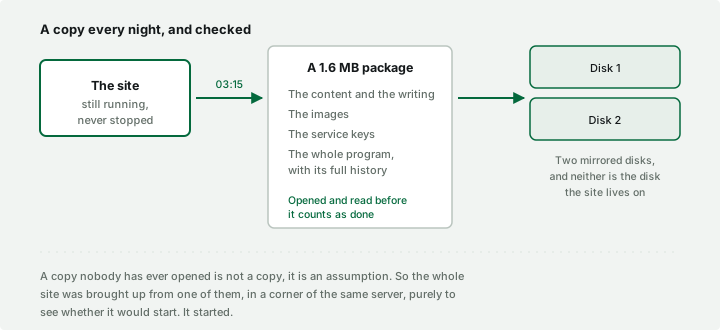
Every night, at quarter past three, the whole site is copied into a 1.6 megabyte package: the text, the images, the service credentials and the complete program with its entire history of changes. It ends up on two mirrored disks, which are not the disk the site lives on: a copy kept in the same place as the original doesn’t protect you from the only thing that really fails, which is the place itself giving out.
Two details strike me as the important ones. First: before declaring the backup good, the process itself opens it and checks that it can be read. A copy nobody has ever opened isn’t a copy, it’s an assumption.
Second: I tested it in reverse. I took a copy and rebuilt the entire site from scratch with it, in a quiet corner of the same server, just to see whether it would start. It did. Until that moment I had backups; from that moment on I had backups that work.
And now… the plot twist.
It wasn’t me; it was Claude. One prompt, a few iterations, and over the course of a weekend, we built this website from scratch. I steered the ship; she did the coding. And now for the double plot twist: this very blog post you’ve just read was also generated by Claude. The future of software engineering is AI, and that future is NOW.